Get your Rise of Kingdoms bot running
Buy a plan, pay by PayPal, sign your game account in with a one-time code. The bot then runs on our servers around the clock, and you can still play whenever you like.
Four steps from sign-in to a running bot
-
Sign in
Go to bots.aurorabot.net and press Login with Discord. Your Discord account is your Aurora account.
-
Buy a plan
Open Subscriptions on the left. Under Buy or renew, set how many you want of each bot and press Get payment code. Several bots at once get one note, paid with one PayPal payment.
Bot What one seat covers 1 month Gem Pro One character $50 Gem One character $25 Chain One character $40 Fort One character $12 Farm One character $1.50 -
Pay by PayPal
SendThe exact amount shown, as Friends & FamilyTopayments@aurorabot.netNoteFFKRTQ25example: use your own codeYour seats appear on the Subscriptions page within a few minutes. Keep the code: paying it again later renews the same seats.
Want to pay with crypto or another payment method? Create a ticket in our Discord.
-
Link your game account
Press + Link a game account, then:
- Pick the bot and your region: International, Gamota or Korean
- Enter the email of your Rise of Kingdoms account and press Send code
- Type the 6-digit code Lilith emails you
- Pick the characters the bot should run
The bot starts on its own. You never need a password.
If the sign-in doesn't go smoothly
- The code hasn't arrived
- Check your spam folder. After a minute you can press Send a new code. Always use the newest one.
- The code was rejected
- Type it again. The code step stays open.
- You typed the wrong email
- Press Use a different email.
- The sign-in failed
- You're taken back to the email step. The Send button counts down until you can try again, because sign-ins are spaced a couple of minutes apart.
Playing yourself
Logging in on your phone kicks the bot off. It logs back in 5 minutes after you log out, and your marches keep running in the meantime.
- Change that wait under Settings › Auto re-login after a kick.
- Use Wait before the first login if you need time to leave the game after pressing Start.
Configure your bot
Where settings live

Open your account, then the Settings tab. Changes save by themselves, even while the bot runs.

- ⚙ opens the task's options
- Switch turns the task on or off

Want one character different? Characters tab › pick it › switch on Customize this character.
Every bot
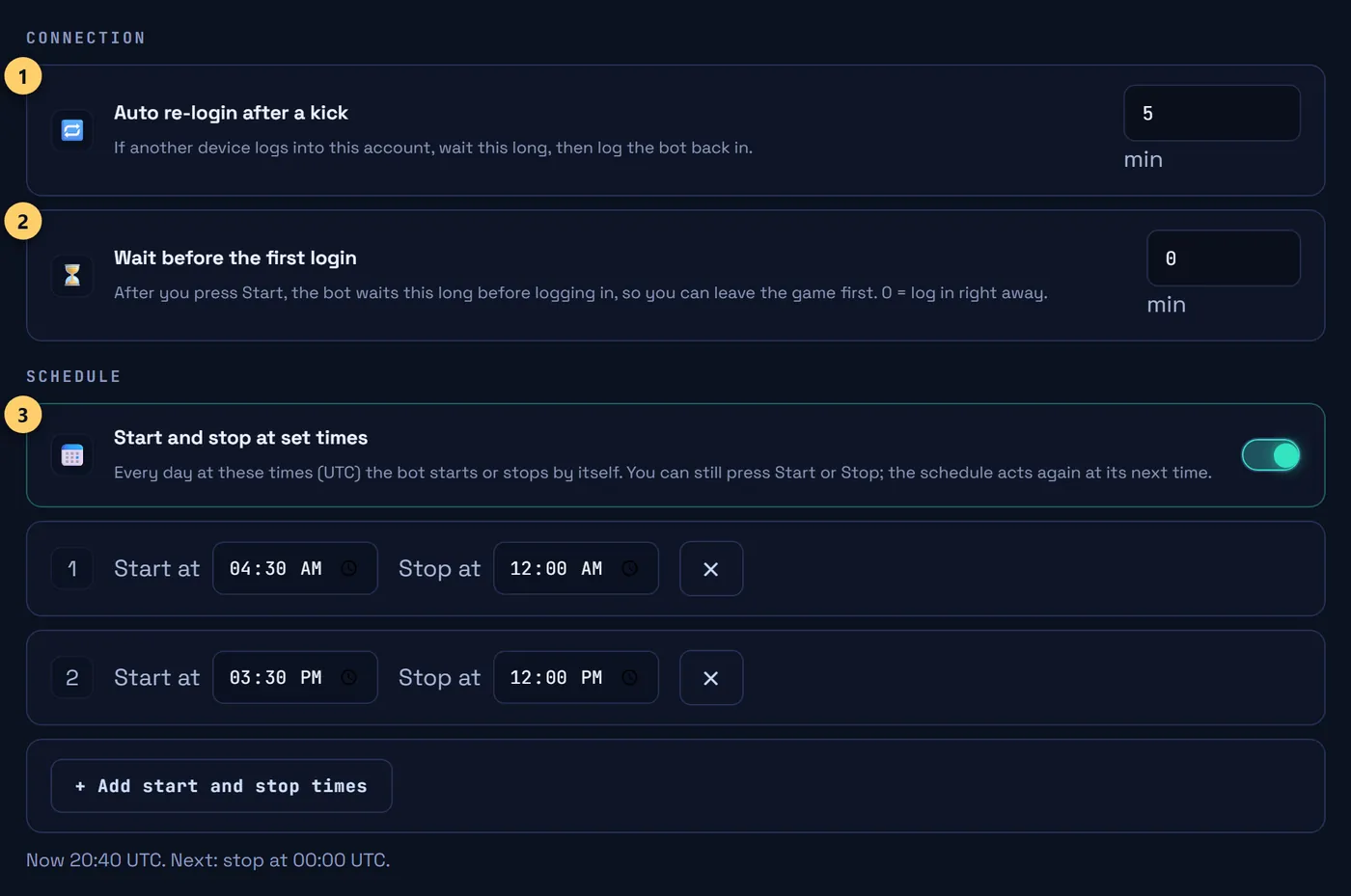
- Wait before logging back in after you play. Default 5 min
- Wait before the first login after Start
- Daily start and stop times, in UTC
Gem Pro Gem Bot Pro
Gem gathering and barbarian chaining on one character. Gem gathering is set up like the Gem bot below; barbarian chaining has its own card above it.
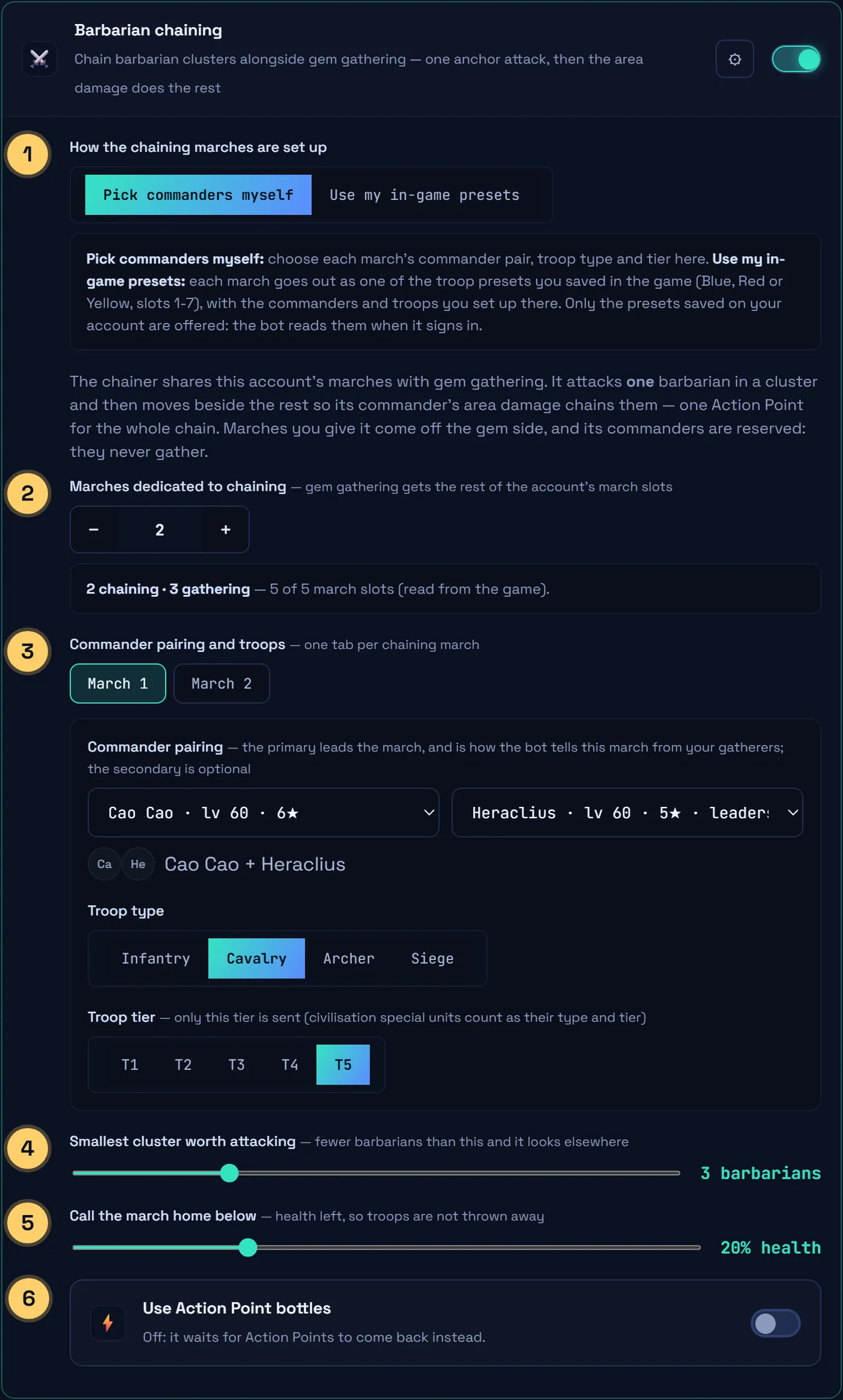
- Pick each march's commanders yourself, or use the troop presets saved in your game
- Marches that chain. Gem gathering gets the rest of your march slots
- One tab per chaining march: commander pair, troop type and tier
- Skip clusters with fewer barbarians. Default 3
- Bring the march home below this health. Default 20%
- Drink AP bottles when Action Points run out. Default off
Chaining commanders never gather gems.
Using your in-game presets
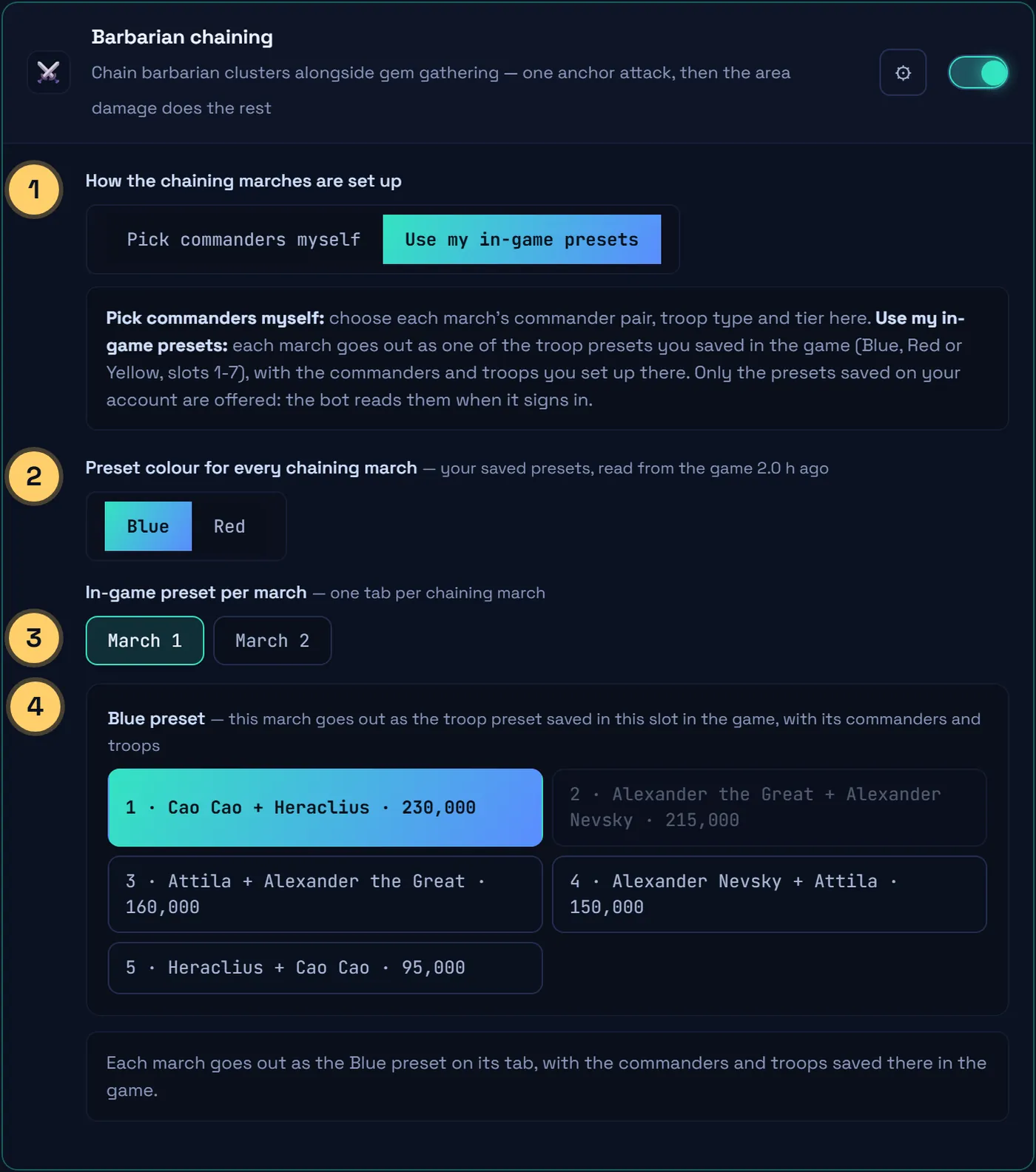
- Switch to Use my in-game presets
- One preset colour for every chaining march
- One tab per chaining march
- The preset that march goes out as. Only presets saved in your game are listed
March slots
- Chaining and gem gathering always add up to your march slots, read from the game: 5 in the home kingdom, 6 or 7 for some KvK accounts.
- The account's Settings fit the character with the fewest march slots. To use a 6th or 7th march, give that character its own settings: Characters tab › pick it › Customize this character.
- A customized character keeps its own chaining and gathering counts. Changes to the account's Settings don't reach it.
Gem Bot Pro also does everything the Gem bot does: rallies, pit, flag and chores.
Already on Gem Bot or Chain Bot? The account page offers Upgrade to Gem Bot Pro. You pay only the difference for the days you have left, and your end date stays the same.
Gem Gem bot
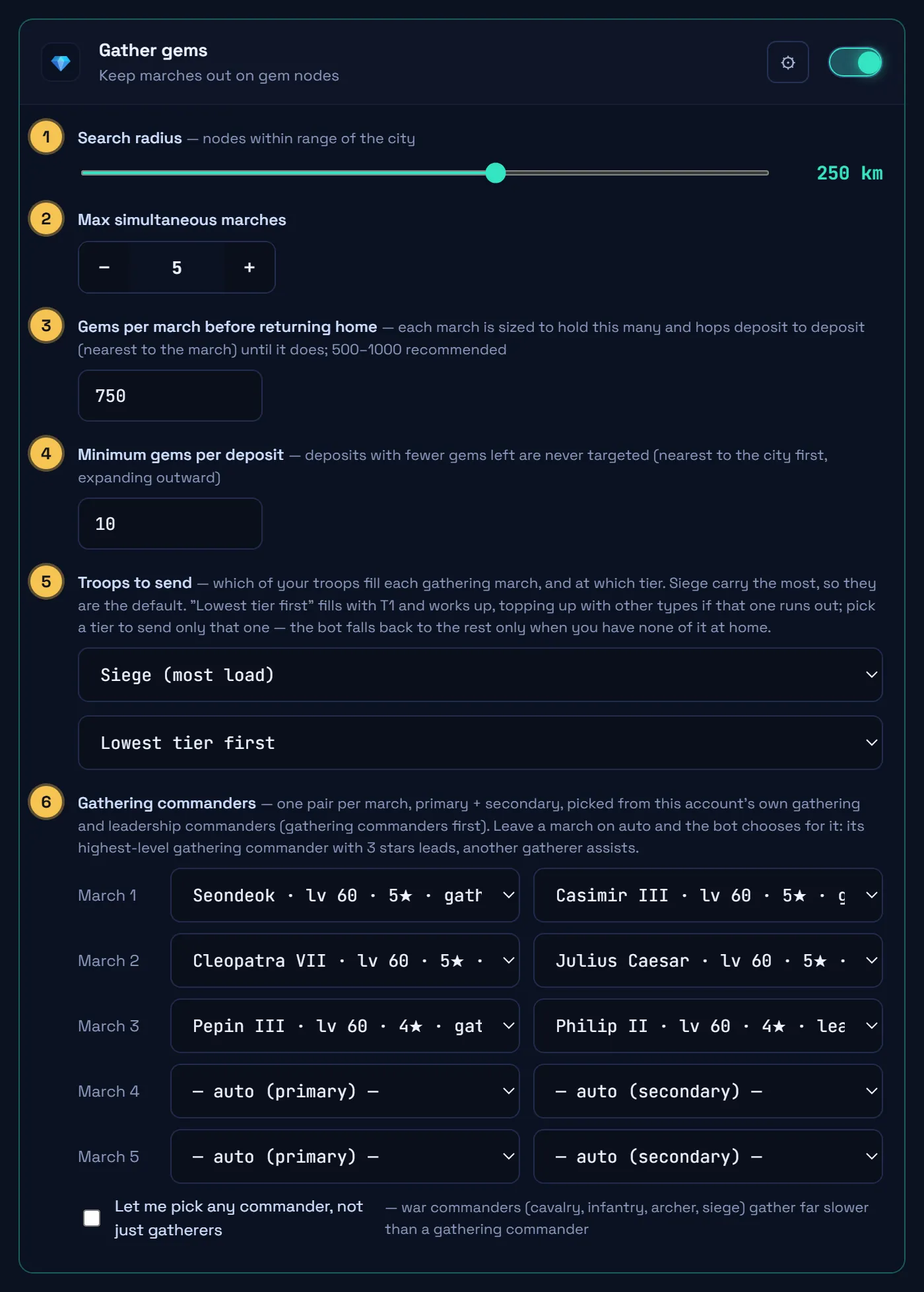
- How far to look for deposits. Default 250 km
- Marches out at once: your number of march queues
- Gems a march carries home. 500–1,000 recommended
- Skip deposits with fewer gems left
- Troops that fill each march, and their tier. Default: siege, lowest tier first
- A commander pair per march, or leave it on auto
The Gem bot can also do everything below: rallies, pit, flag and chores.
Chain Chain bot
Barbarian chaining with no gem gathering, set up like the chaining card of Gem Bot Pro. Pick how many marches chain, up to every march slot you have. Give each march its commanders, troop type and tier, or let it go out as one of the troop presets saved in your game. The slots you keep free stay for rallies and your own marches.
Fort Fort bot
Rally forts
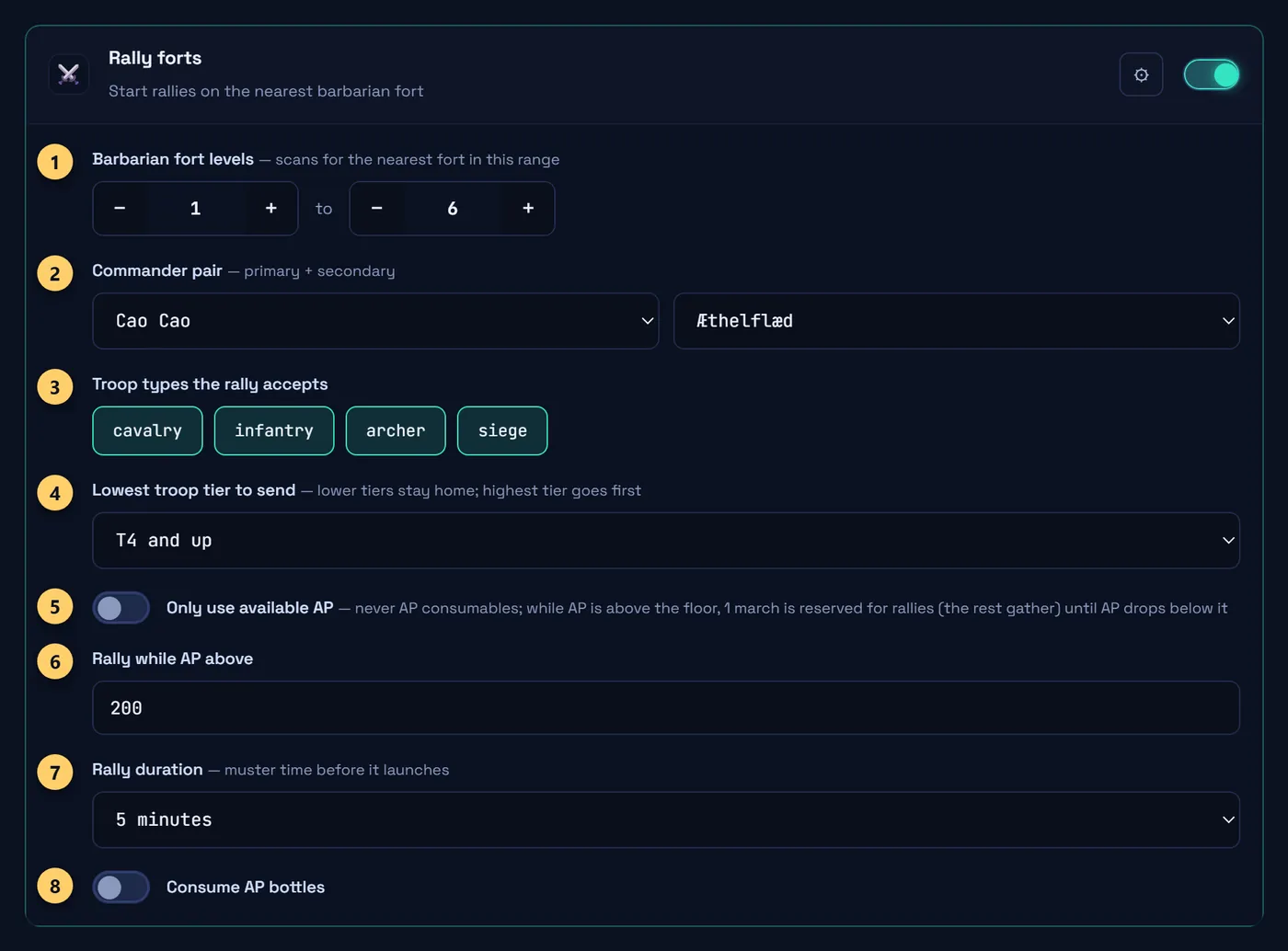
- Fort levels to rally. Default 1 to 6
- Commanders leading your rallies
- Troop types allowed to join
- Lowest tier sent. Default T4
- Never use AP items
- Stop rallying below this AP. Default 200
- Rally wait time. Default 5 min
- Allow AP bottles
Join fort rallies
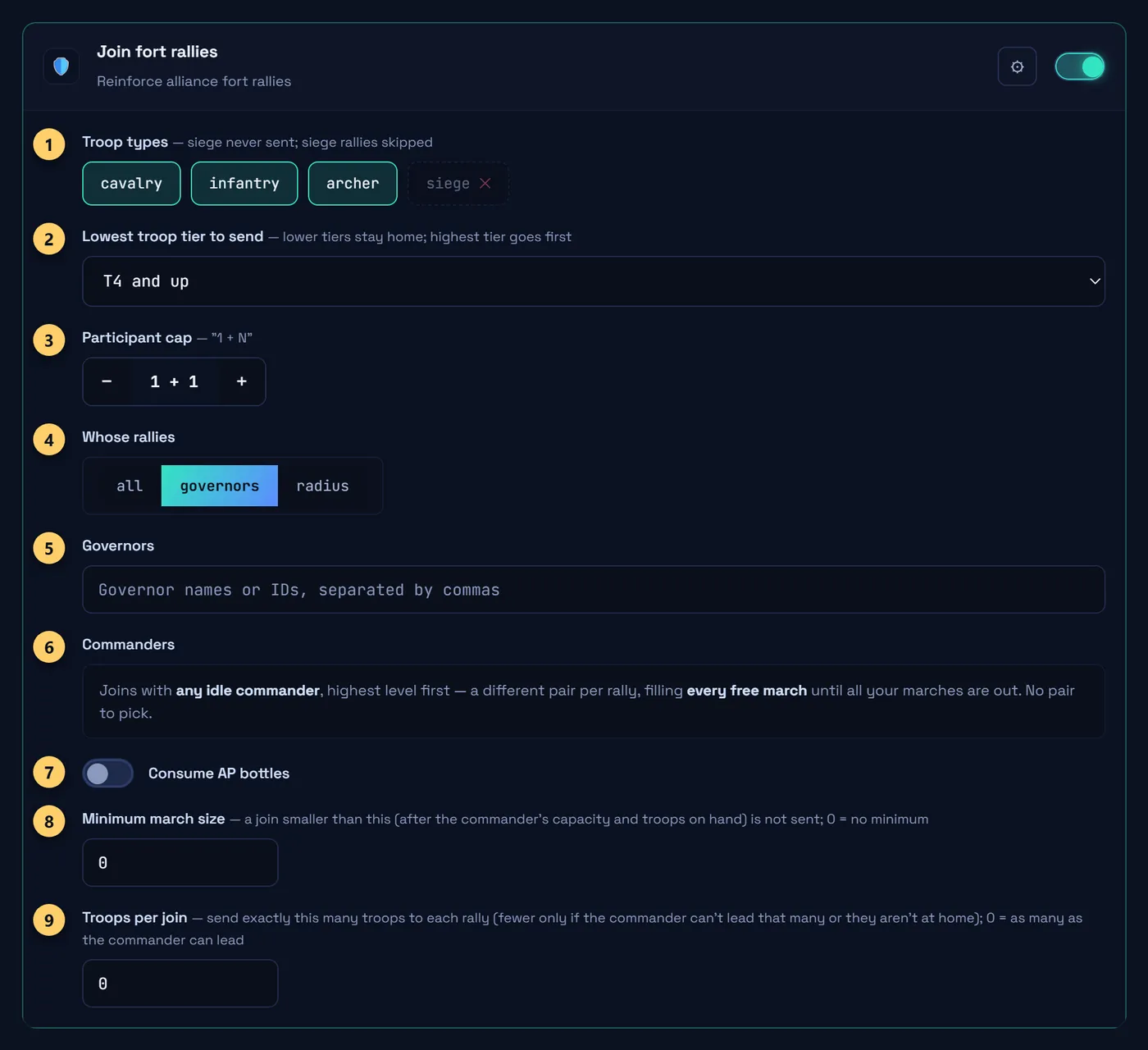
- Troop types to send (never siege)
- Lowest tier sent. Default T4
- Only join rallies with room left
- Whose rallies to join: all, governors or radius (see below)
- Your list of governors, by name or ID (only for governors)
- Commanders: picked for you, nothing to set
- Allow AP bottles
- Skip joins smaller than this. 0 = no minimum
- Exact troops per join. 0 = as many as the commander leads
Shifts and march order
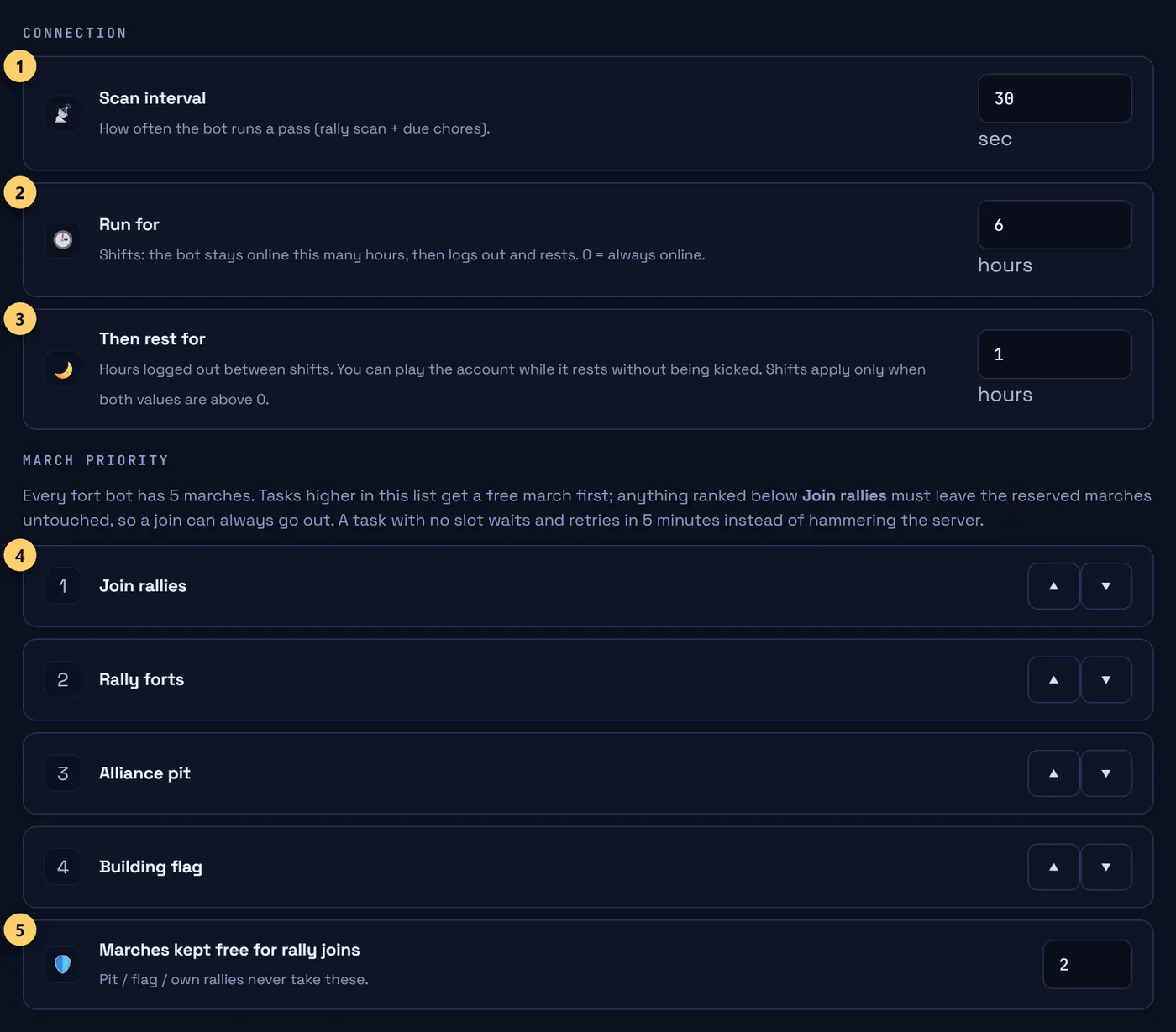
- How often it checks for rallies. Default 30 s
- Hours online per shift. 0 = always online
- Hours logged out between shifts; play freely meanwhile
- Which task gets a free march first
- Marches always kept free for joins. Default 2
Alliance pit and flag
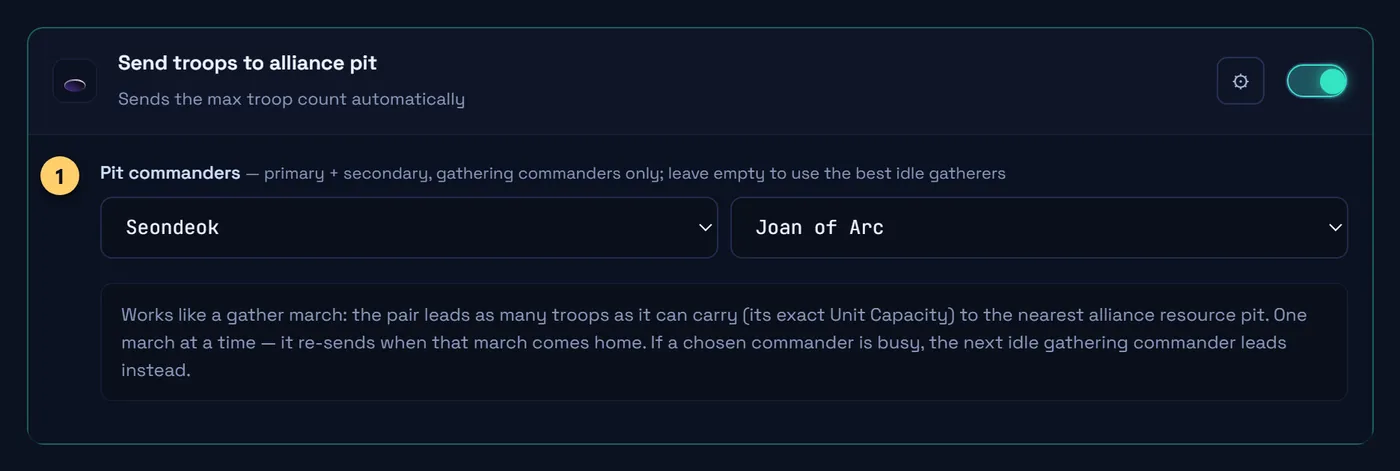
- Gathering commanders for the pit. Empty = best idle ones
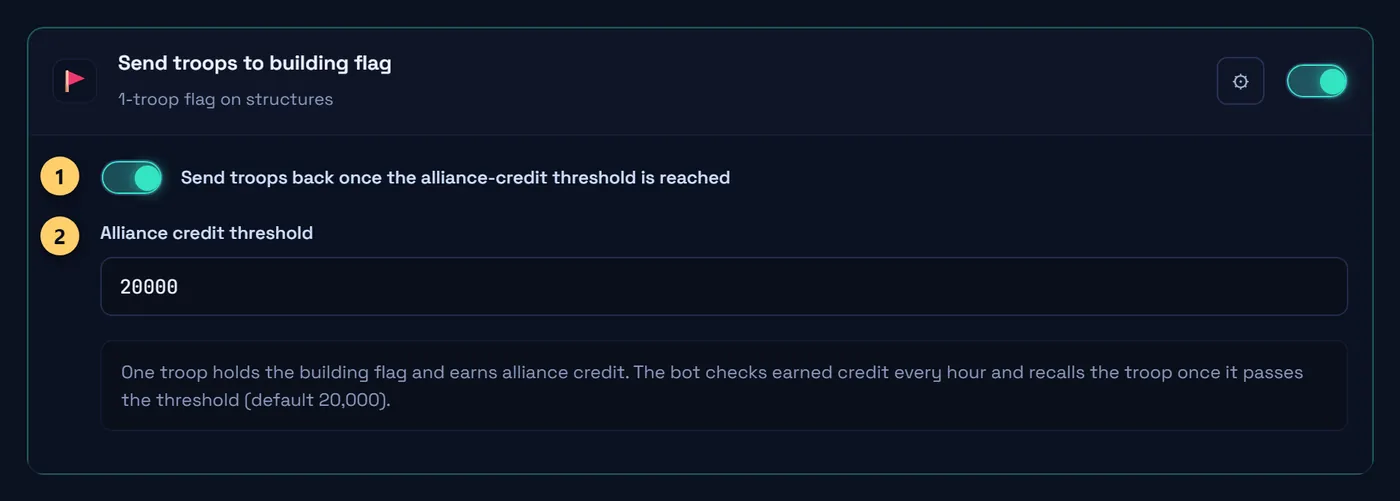
- Bring the flag troop home once it has earned enough
- Alliance credit to earn first. Default 20,000
Farm Farm bot
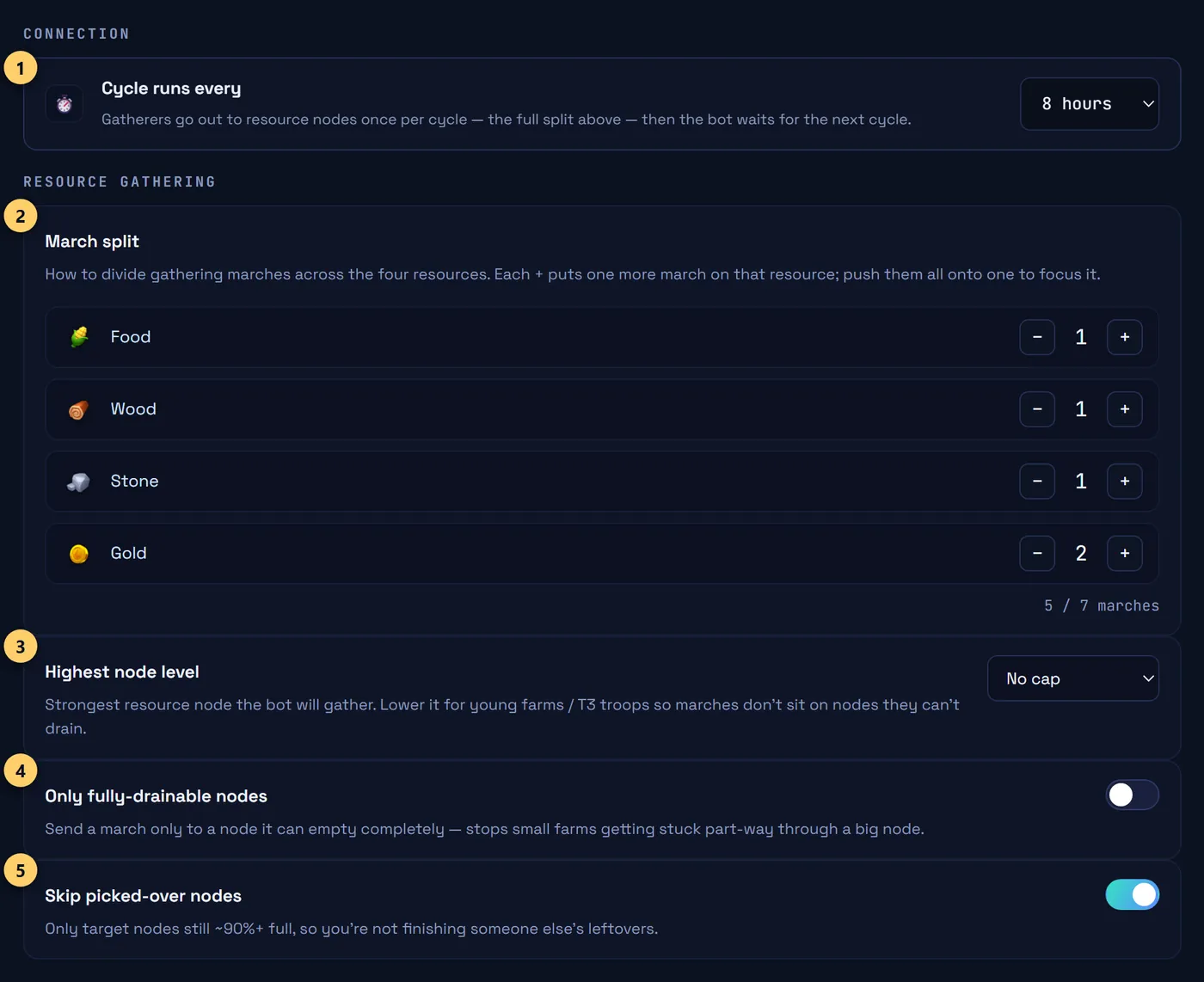
- How often it logs in to send marches. Default 8 h
- Marches per resource. Default 1 · 1 · 1 · 2 gold
- Strongest node to gather
- Only nodes a march can empty
- Only nodes still about 90% full
No gems, rallies or healing on the Farm bot.
Chores, for every bot
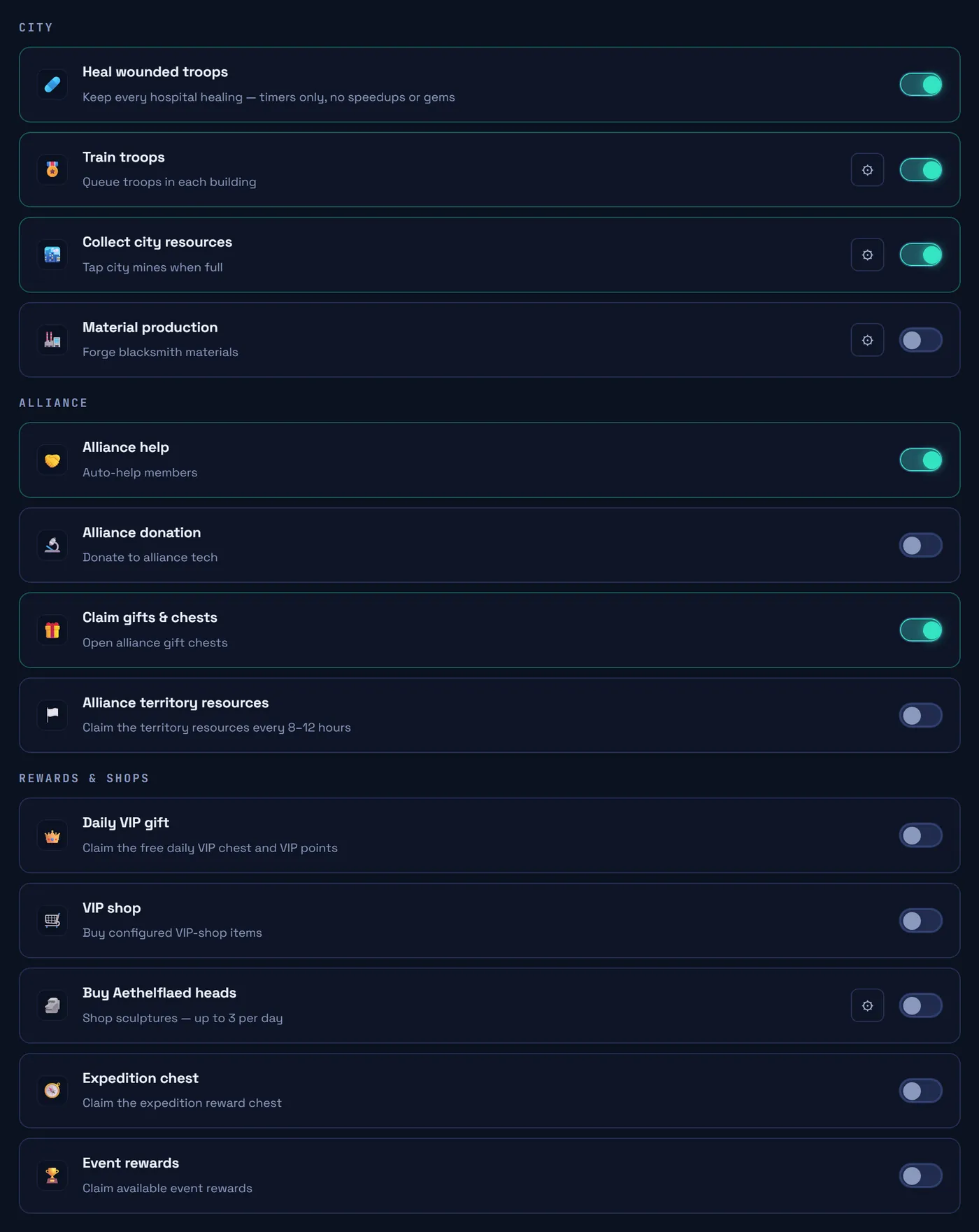
Switch on what you want done for you. Healing is on every bot but the Farm bot.
Reading the site
- Online
- Signing in
- Farm bot asleep between cycles
- Stopped
- Overview
- Live feed of all your bots
- Live tab
- One account's feed and marches
- Inventory
- What was gathered today, in the last 7 days and in the last 30 days
Refer a friend
Your friends pay 20% less on their first payment. You get 20% of that payment as credit, then 10% of every payment they make after it. Spend it on your subscriptions, or cash it out once you have $50.
Send your code

- Your referral code. It is your customer ID
- Your link. Opening it and signing in applies your code
- A ready message with both, to paste to friends
- Credit you can spend now
- Credit on hold for 7 days after each payment a friend makes
Open Refer a friend in the menu. Your code is also on Subscriptions, under your customer ID.
Got a code from a friend?

Enter it in Subscriptions before you buy: your next payment is 20% less.
Spending credit
- Tick Pay with my credit when you get a payment code. If your credit covers the whole price, the plan starts at once.
- If it covers part, pay the rest by PayPal within 7 days, or the credit goes back to your balance.
- If a friend's payment is refunded, the credit it gave you is taken back.
Cashing out
- Once you have $50 of credit from friends, enter your PayPal email under Cash out on Refer a friend and press Request cash-out.
- We send the money by PayPal ourselves and mark it paid there.
- Only credit earned from friends can be cashed out, after its 7-day hold.
- Credit we add by hand can only be spent.
Good to know
- Press Rescan commanders on the account page after levelling commanders or changing gear.
- If you see "Stations busy", try again in a minute.
- A Re-login flag means the account needs linking again. Your settings are kept.
- The bot never spends gems or speedups.
⚠ A red Conduct warning on your account means the game has lowered that account's Conduct Score.
Below 81 the game halves gathering income. Contact us if you see it.